Open-source Ledger alternatives compared: Keycard, Trezor, Coldcard and more
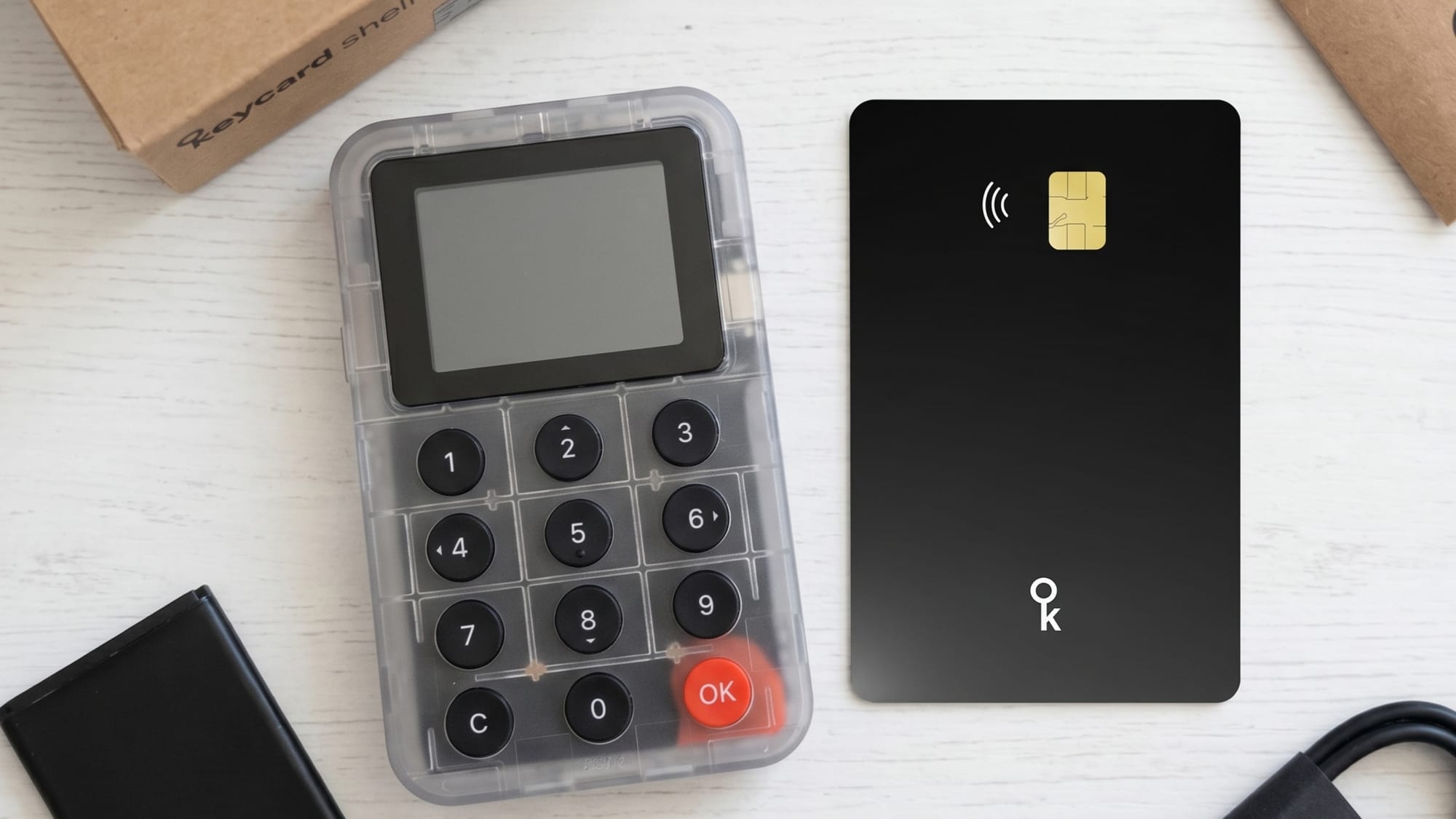
If you want a hardware wallet whose signing code you can inspect rather than take on trust, the strongest open-source alternatives to Ledger are Keycard, Trezor, Coldcard, and BitBox02. Each takes a different approach to firmware transparency, secure element design, and air-gapped operation. Ledger's firmware remains partially closed, which means users cannot independently verify what code runs on their device. If that matters to you, the decision comes down to which trade-offs across form factor, chain support, and verification depth fit your threat model.
Ledger uses a proprietary operating system (BOLOS) on its secure element. The hardware chip itself carries a strong certification, but the firmware that controls key derivation, signing logic, and communication with the host is not fully auditable by third parties. For many users this is an acceptable trust trade-off, particularly given Ledger's track record and market share. For others, especially those who want to compile firmware from source and verify the binary running on their device, it is a hard stop.
Open-source firmware changes the trust model in a concrete way. Instead of trusting the vendor's claim that no exfiltration path exists, you (or any competent auditor) can read the signing code, the communication stack, and the bootloader. Reproducible builds go one step further: they let you compile the published source on your own machine and confirm the resulting binary matches what ships on the device. This is verifiability in practice, not just in principle.
The trade-off is real, though. Publishing firmware source code means attackers also get to study it. Open-source projects rely on the principle that broad scrutiny outweighs attacker advantage, and decades of evidence in cryptographic software supports this. But it does not eliminate bugs or design errors. It only makes them findable.
This table compares five devices on the axes that matter most when moving away from Ledger's closed firmware. Every claim below reflects publicly documented specs.
| Attribute | Keycard (card + Shell) | Trezor Model T / Safe 5 | Coldcard Mk4 / Q | BitBox02 | Ledger Nano X / Stax |
|---|---|---|---|---|---|
| Secure element | NXP JCOP4 P71, EAL6+ (chip-level CC) | None (Model T); Optiga Trust M (EAL6+) on Safe 5 | ATECC608B/C (SE1) + Maxim DS28C36B (SE2) + MCU | ATECC608B + MCU | ST33 (EAL5+ Nano X / EAL6+ Stax) |
| Firmware openness | Open source (MIT) | Open source (AGPLv3) | Open source (non-permissive license) | Open source (Apache) | Partially closed (BOLOS proprietary) |
| Hardware design openness | Open & production-ready (full fab files, CERN OHL v2) | Open but not complete for production (CERN OHL v2) | Closed | Closed | Closed |
| Reproducible builds | Yes (Shell firmware) | Yes (community-verified) | Yes | Yes | No |
| Air-gapped signing | Yes, Shell camera + QR (ERC-4527 / BC-UR) | No (USB / Bluetooth) | Yes, QR on Coldcard Q; microSD on Mk4 | No (USB only) | No (USB / Bluetooth) |
| Form factor | Credit-card smartcard + pocket Shell | Touchscreen USB dongle | Standalone device with keypad | USB dongle | USB dongle / touchscreen |
| Firmware updatable? | Card: no (immutable by design). Shell: yes, signature-verified, rollback-safe | Yes | Yes | Yes | Yes |
| Chain support | Bitcoin + Ethereum / all EVM L2s | Multi-chain (1000+ tokens) | Bitcoin only | Bitcoin, Ethereum, LTC, ADA + 1500+ tokens | Multi-chain (5000+ tokens) |
Keycard and Coldcard are philosophical peers: both prioritize rigorous security through air-gapped signing and open-source verification. Where they diverge is their ecosystem focus. Coldcard is strictly for Bitcoin maximalists, while Keycard brings that same uncompromising security model to Ethereum, EVM L2s, and Bitcoin.
For users who want thousands of altcoins alongside full source availability, Trezor provides the broadest chain support, now properly reinforced by an EAL6+ secure element on the Safe 3 and Safe 5 lines, though it lacks an air-gapped workflow. BitBox02 strikes a solid middle ground with reproducible builds and a clean UX, but relies entirely on a USB connection.
Ledger remains the outlier in this lineup as the only device with closed firmware on its secure element. Splitting firmware openness from hardware openness surfaces an even sharper distinction: only Keycard and Trezor publish their hardware designs as well as their firmware. Coldcard, BitBox02, and Ledger keep their hardware schematics closed, requiring users to trust their physical supply chains without community hardware auditing.
The core job of a hardware signer is keeping private keys away from the host computer. The mechanisms vary significantly.
Keycard runs a BIP-32 HD wallet as a JavaCard applet on the NXP JCOP4 P71 secure element. The host sends an unsigned transaction hash over ISO 7816 APDU commands (via NFC tap or contact interface through the Shell). The card signs internally and returns only the signature. Keys are non-extractable. The card has no battery, no network interface, and no updateable firmware, which eliminates an entire class of supply-chain and remote-attack vectors. The trade-off is that new cryptographic capabilities (like Schnorr/BIP340) require a new card revision rather than a firmware patch.
Trezor historically relied on general-purpose MCU storage in its legacy devices, the Model One and Model T, leaving seeds in flash memory where physical extraction was demonstrated using lab equipment. Trezor's current flagship generation, including the Safe 3, Safe 5, and Safe 7, upgrades this architecture by pairing the main MCU with an EAL6+ certified secure element (Optiga Trust M and TROPIC01). This hybrid model addresses physical extraction risks while running signing operations on the open-source MCU.
Coldcard uses a three-chip architecture: two secure elements, an ATECC608B/C (SE1) and a Maxim DS28C36B (SE2), plus an MCU (STM32L4) that runs the signing logic. The seed is encrypted with key material split across all three chips, so all three must be compromised to extract it. The secure elements enforce PIN throttling and hold the encrypted secret but do not perform ECDSA signing; the seed is decrypted into the MCU's RAM at signing time. This is a deliberate Coinkite design choice (running Bitcoin signing on the audited libsecp256k1 library in the open MCU rather than trusting a closed-source secure element with the operation), and a meaningful architectural difference from designs where the signing itself happens inside the certified element.
BitBox02 uses a dual-chip architecture (an ATECC608B secure element plus an ATSAMD51 MCU), with the secure element handling attestation and PIN throttling while signing occurs in the main processor. It follows the same open-MCU-signing philosophy as Coldcard, but with a single secure element rather than two.
Physical theft. All five devices use PIN protection. Keycard's EAL6+ secure element is evaluated against physical probing and side-channel attacks at the highest widely used Common Criteria level. Coldcard's ATECC608B provides PIN attempt throttling but carries a lower assurance certification. Trezor Model T without a secure element is the most vulnerable to physical extraction with professional equipment.
Malware on the host. This is where air-gapped signing pays off. Keycard Shell and Coldcard Q both use QR-based transaction transfer, meaning the signing device never needs a data connection to the potentially compromised host. The user verifies transaction details on the device's own screen. Trezor (Model T), BitBox02, and Ledger all require USB (or Bluetooth for Ledger), which expands the attack surface.
Blind signing. Even with air-gapped signing, a user who approves a transaction without reading the on-device display gains no protection. Keycard Shell decodes ERC-20 transfers, EIP-712 typed data, and Bitcoin PSBTs with amount, recipient, and fee shown on its screen. No device can protect against a user who ignores that display.
Ledger's ecosystem centers on Ledger Live, a polished companion app with portfolio tracking, staking integrations, and a curated app store. That integration is convenient, but it is also a lock-in. Ledger Live is effectively required to set up and manage the device, and the same app doubles as a storefront: it surfaces buy, swap, and staking offers and pushes Ledger's own services and upsells. You are tied to one vendor's software, and that software markets to you.
Moving to an open-source alternative trades that integrated experience for freedom of software choice. While Trezor and BitBox02 maintain their own dedicated companion apps, Keycard Shell and Coldcard dispense with proprietary apps entirely, relying on standard QR code signing with third-party wallets. Keycard connects to 15+ third-party wallets (MetaMask, Sparrow, Nunchuk, Rabby, and others) with no proprietary software required. This is a deliberate architectural choice by the Keycard team: the signing device does one thing well, and whichever wallet software you choose handles everything else.
Ledger also supports the widest range of chains and tokens. Keycard covers Bitcoin and Ethereum plus all EVM chains and L2s. Coldcard is Bitcoin-only. Trezor and BitBox02 fall in between. Choose based on what you actually sign for, not the longest spec sheet.
Is Ledger's firmware really closed source?
Ledger publishes the SDK and some application code, but the core operating system (BOLOS) that runs on the secure element is proprietary. Users cannot compile and verify the firmware that controls key operations. This is the fundamental difference from fully open-source alternatives.
Does Keycard have a secure element like Ledger does?
Yes. Keycard uses the NXP JCOP4 P71, which carries an EAL6+ Common Criteria certification at the chip level. That is comparable to Ledger's top-tier EAL6+ devices (Nano S Plus, Stax, Flex) and higher than the EAL5+ rating on the Nano X's ST33 secure element. Both certifications are scoped to the chip, not the whole device.
Can I use Keycard without the Shell?
Yes. Status and WallETH connect to the bare card over NFC by tapping it to a phone; Sparrow connects through a USB smart-card reader using the card's contact interface (not NFC). Either way, no Shell is required. The Shell adds a screen, keypad, and camera for air-gapped QR signing, but the card on its own is a fully functional hardware signer with no network connectivity.
Why can't Keycard firmware be updated?
The Keycard applet is locked and immutable once deployed, with GlobalPlatform keys randomized. This is a deliberate supply-chain defense: there is no mechanism through which a compromised update could alter the signing logic. It also guarantees permanence. The place your keys live cannot change behavior after you set it up, so no later update, whether from the Keycard team or from a government trying to compel one, can quietly change how the card handles your keys. The Shell firmware, which handles display and QR communication, is updateable with signature verification and rollback protection.
Is Trezor safe without a secure element?
This mostly concerns older models. The original Model One and Model T store the seed in general-purpose flash, and physical extraction with lab-grade equipment was publicly demonstrated years ago. Trezor's current line, the Safe 3 and Safe 5, all ship a secure element (Optiga Trust M, EAL6+) that closes that gap, so a new Trezor is not a device without a secure element. If you still run an older Model T, a BIP39 passphrase, which is never stored on the device, mitigates the extraction attack.
Does Coldcard support Ethereum?
No. Coldcard is a Bitcoin-only device. If you need to sign Ethereum or EVM-chain transactions, Keycard, Trezor, or BitBox02 are the open-source options with that capability.
Can I verify that my Keycard Shell runs the published firmware?
Yes. The Shell firmware supports reproducible builds. You can compile the source from the public GitHub repository and compare the resulting binary hash against what runs on your device. The Keycard applet source is also open (MIT-licensed), though the NXP JCOP4 P71 silicon itself is proprietary, which is a shared trust assumption across all hardware wallets using commercial secure elements.
What wallets work with Keycard?
Keycard is compatible with over 15 wallets including MetaMask, Rabby, Sparrow, Nunchuk, BlueWallet, Specter, UniSat, imToken, Bitget, Status, and others. Connection paths include NFC tap, USB HID, and air-gapped QR (ERC-4527). No proprietary companion app is required.
How does air-gapped QR signing actually work on the Keycard Shell?
The paired wallet software on your computer or phone displays the unsigned transaction as an animated QR code (using the BC-UR / UR2.0 standard). The Shell's global-shutter camera scans that QR, decodes the transaction, and displays it for your review. After you approve with a physical button press, the Shell passes the hash to the Keycard for on-card signing, then displays the signed result as a new QR code for the wallet to scan back. No data cable, Bluetooth, or Wi-Fi is involved at any point.